
Opened 13 years ago
Last modified 8 years ago
#862 closed enhancement
Search Tool Reset Tabs Functionality — at Version 13
| Reported by: | Martin Reisinger | Owned by: | Pete Cyr |
|---|---|---|---|
| Priority: | major | Milestone: | Next Release - CT |
| Component: | Curator Tool | Version: | N/A |
| Severity: | Keywords: | interface, tabs, tab manager, search tool | |
| Cc: | Database Engine: | N/A | |
| Operating System: | N/A |
Description (last modified by )
Currently, the CT installation respects existing files in the C:\Users\username\AppData\Roaming\GRIN-Global\Curator Tool folder. After an installation, for various reasons, some users then experience issues such as not seeing reports. In the latest CT installation procedure, after a successful install, when the user starts up the CT, if the files already exist in that folder, they do not get overlaid.
Somehow a method is needed to delete or rename the older AppSettings.txt and ReportsMapping.txt files in the user's "Roaming" folder. Then copy the two new files from the C:\ProgramData\GRIN-Global\Curator Tool folder to the C:\Users\username\AppData\Roaming\GRIN-Global\Curator Tool folder. Renaming rather than deleting any pre-existing files in that Roaming folder is probably preferred. The older files should have their extensions renamed to .formertxt or something similar. The few advanced users who edit their .txt files will know what to do to combine the old settings with the new.
Unlike AppSettings.txt and ReportsMapping.txt, the WebServiceURL.txt file should remain, because most likely the user will continue using the same server(s). However, the other two .txt files are often affected by the build for the new CT, and the typical user wants/needs the most recent versions.
Documentation needs to indicate how to get fresh copies of the two files and the fact that the older files have been retained.
Change History (14)
comment:1 by , 12 years ago
comment:2 by , 12 years ago
| Description: | modified (diff) |
|---|---|
| Priority: | minor → medium |
comment:4 by , 10 years ago
| Description: | modified (diff) |
|---|---|
| Keywords: | tabs tab manager added |
| Milestone: | Post 1.0 → CT (TBD) |
| Version: | 1.9.2 → N/A |
comment:5 by , 10 years ago
Maybe this ticket could be completed in stages because of other more urgent priorities. For starters, just add a button to the ST to reset the default DV tabs. Users (at least I do!) spend a lot of time scrolling back and forth among tabs because I often have many open at one time for various reasons.
comment:6 by , 9 years ago
| Resolution: | → fixed |
|---|---|
| Status: | new → closed |
comment:7 by , 8 years ago
This ticket has not been resolved, but embedded in trac ticket http://trac.ars-grin.gov/trac/GG/ticket/1530
by , 8 years ago
| Attachment: | reset_search_tool_tabs.jpg added |
|---|
comment:8 by , 8 years ago
| Resolution: | fixed |
|---|---|
| Status: | closed → reopened |
comment:9 by , 8 years ago
| Description: | modified (diff) |
|---|
comment:10 by , 8 years ago
| Summary: | Tab Manager for Search Tool Needed → Search Tab Reset Tabs |
|---|
comment:11 by , 8 years ago
| Summary: | Search Tab Reset Tabs → Search Tool Reset Tabs Functionality |
|---|
comment:12 by , 8 years ago
| Milestone: | CT (TBD) → Next Release - CT |
|---|---|
| Priority: | medium → major |
comment:13 by , 8 years ago
| Description: | modified (diff) |
|---|


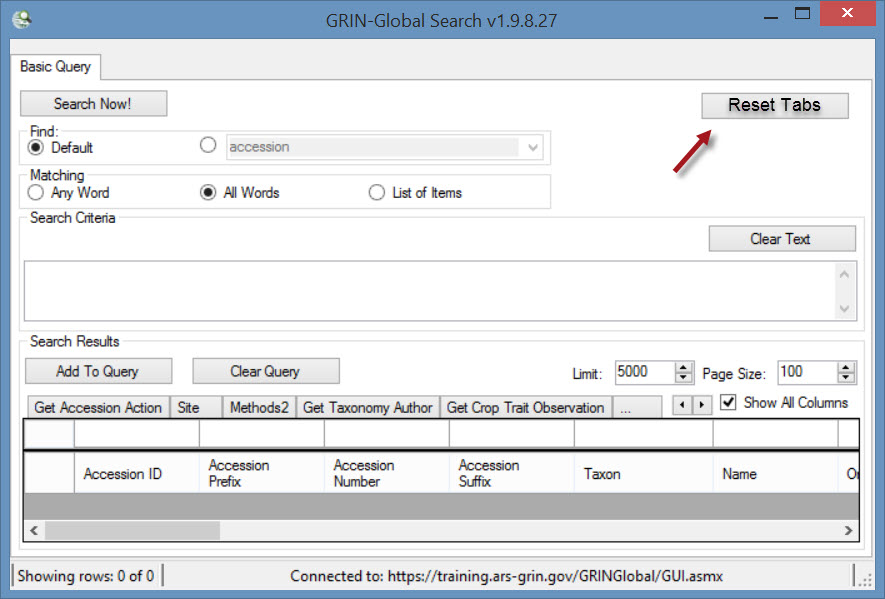
Also, when selecting a tab to display, ideally the tab would display its default (friendly) dataview name -- this default name could be highlighted, so that the user could accept by simply pressing Enter, or type over (to edit) before pressing Enter.
Ideally the Tab Manager could also have a way to group tabs, so that the user could display/hide the group(s), which in turn would display/hide individual DV tabs