
Opened 8 years ago
Last modified 8 years ago
#1759 new defect
CT Panels Need to be Scrollable
| Reported by: | Martin Reisinger | Owned by: | Pete Cyr |
|---|---|---|---|
| Priority: | major | Milestone: | CT (TBD) |
| Component: | Curator Tool | Version: | CT 1.9.8.28 |
| Severity: | Keywords: | interface, scrolling | |
| Cc: | Database Engine: | N/A | |
| Operating System: | N/A |
Description (last modified by )
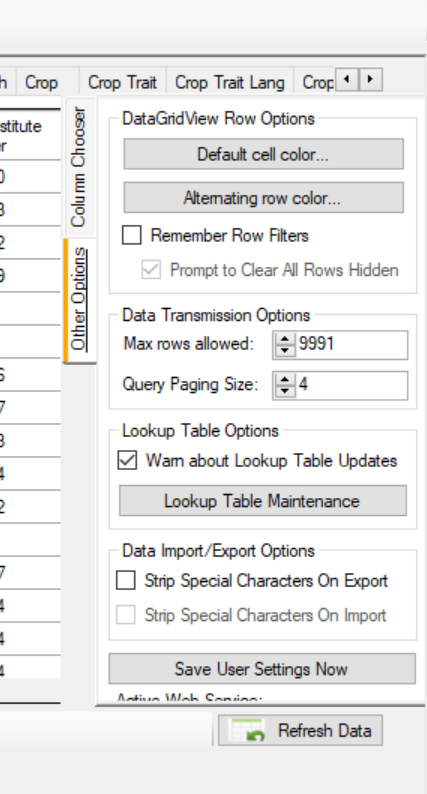
The CT screen's individual panels should be scrollable. In the .28 version, where new items where added under Other Options, it is almost impossible to see the lower items in the Other Options "panel."
This is an issue as many screens are in a wider format. In one workshop, a user running the CT with a tablet could not get to the Data Editing buttons (so she could never use the CT to edit).
Attachments (6)
Change History (11)
by , 8 years ago
| Attachment: | other_options_needs_scrollbar_2018-10-05_15-33-18.png added |
|---|
by , 8 years ago
| Attachment: | other_options_needs_scrollbar_2018.2.png added |
|---|
comment:1 by , 8 years ago
| Version: | N/A → CT 1.9.8.28 |
|---|
comment:2 by , 8 years ago
| Description: | modified (diff) |
|---|---|
| Summary: | Other Options Panel Needs to be Scrollable → CT Panels Need to be Scrollable |
by , 8 years ago
| Attachment: | screen_2018-10-05_16-03-54.png added |
|---|
by , 8 years ago
| Attachment: | CT Windows Display.docx added |
|---|
comment:3 by , 8 years ago
by , 8 years ago
| Attachment: | wizard_window_handle.jpg added |
|---|
comment:4 by , 8 years ago
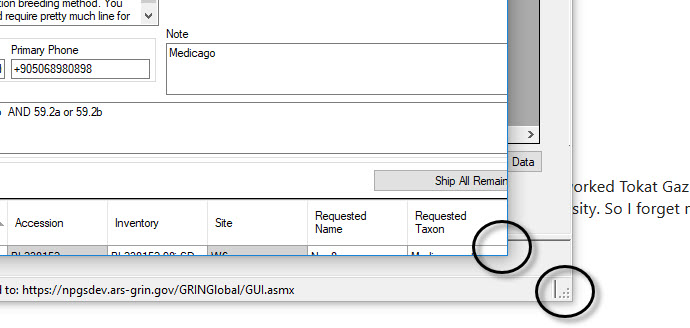
I added an image wizard_window_handle.jpg. Wondering if the wizards can have that handle as the CT does?
by , 8 years ago
| Attachment: | two_wiz_screens_beforeandafter.jpg added |
|---|
comment:5 by , 8 years ago
The attached two_wiz_screens_beforeandafter.jpg indicates that my previous comment is unnecessary. When the full wizard screen displays under certain resolutions, the corner does allow for window size adjustment.
However, as I type this comment, at the resolution required to see the entire OW screen to make that screen capture possible, I can now barely read the text I am typing in this comment. The fontsize on my screen as I type this comment is equivalent to a 6- or 7- pt font in a standard word document. (My screen is a large monitor (24+) attached to a laptop.






After the display was changed to 150% from 100%, the OW screen was still fine and displaying properly in the 150% setting, but when the display is changed to 150%, the window corrupts. Even when you expand using the Windows’ Maximize button, or manually stretch, the window never shows the right or bottom edges. (Word file CT Windows Display attachment illustrates this.)