
Opened 8 years ago
Closed 5 years ago
#1835 closed enhancement (fixed)
Set default sort on virtual tree object accending on text not on primary key
| Reported by: | Mark J. Millard | Owned by: | Pete Cyr |
|---|---|---|---|
| Priority: | minor | Milestone: | |
| Component: | Curator Tool | Version: | CT 1.9.8.29 |
| Severity: | Keywords: | virtual object sort | |
| Cc: | Database Engine: | N/A | |
| Operating System: | N/A |
Description
The virtual object feature of tree objects would be much more useful if there as an ascending sort on the object text. Alternatively allowing one to sort on virtual objects underneath a list tree object might even be better. At present it looks like they are sorted on the primary key which looks to the user as they have been randomized.
Attachments (1)
Change History (6)
comment:1 by , 6 years ago
| Status: | new → addressed |
|---|
comment:2 by , 6 years ago
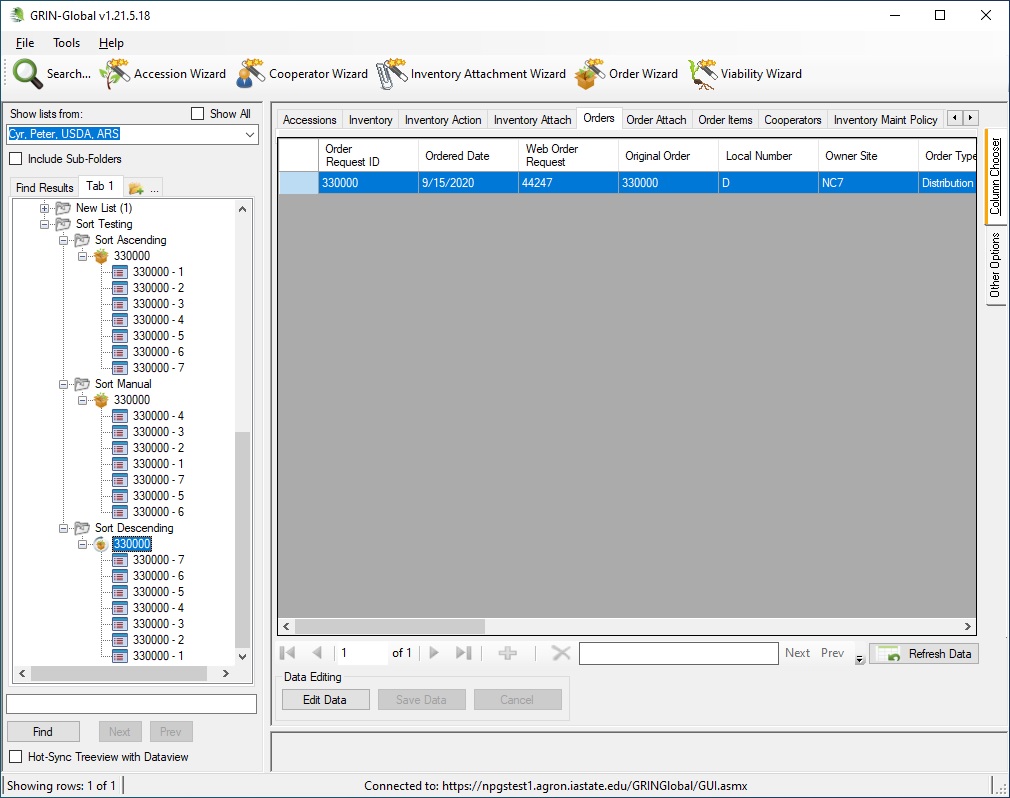
It appears that the sort only applies to virtual objects when the items are expanded visible. If they aren't visible, when the virtual objects are exposed by clicking on the plus sign the virtual objects are not sorted unless the sort is reapplied at the folder level.
by , 6 years ago
| Attachment: | TreeViewSorting.jpg added |
|---|
comment:3 by , 6 years ago
Mark the behavior of the virtual node sorting (as mentioned above in my last comment) follows the sorting preference of the parent folder. For example if you have an order in a folder that has a preference of sort ascending then the virtual nodes will be sorted ascending. If the folder preference is sort descending then the virtual nodes will be sorted descending. The default sort mode for a folder is sort manual - so then the virtual nodes will be sorted in the order they were returned from the remote server. See the attached image showing the three sort modes on order number 330000 when the virtual nodes are expanded in a folder that has its sort preference set to ascending, manual, or descending. NOTE: If you prefer not to change the sorting preference of the folder you can perform a manual sort of all the visible nodes in the folder by using the right-click context menu - but again this is a one-time sort so when you close the CT that sorting will disappear.
comment:4 by , 5 years ago
Works as explained. I thought I saw that at times when changing the sort order on the main node of a list of accessions sorting of the inventory did not appear. After fiddling, it appears that they finally do sort as the main folder.
comment:5 by , 5 years ago
| Resolution: | → fixed |
|---|---|
| Status: | addressed → closed |


Addressed in CT v1.21.5.17
The sorting of virtual nodes now follows the parent folder setting for sorting.