
Opened 17 years ago
Closed 17 years ago
#194 closed defect (fixed)
BZ179 When the hide unchanged rows checkbox is checked in edit mode, double clicking on a cell to bring up list or position cursor for change causes the display to go to one row. First observed client version v1.0.3467.26190
| Reported by: | Mark J. Millard | Owned by: | Mark J. Millard |
|---|---|---|---|
| Priority: | blocker | Milestone: | Beta 2 |
| Component: | Curator Tool | Version: | Beta 1 |
| Severity: | normal | Keywords: | CC1 Client Component 1 |
| Cc: | lisa.burke@…, dbmuge@…, marty.reisinger@… | Database Engine: | N/A |
| Operating System: | N/A |
Description (last modified by )
I was doing some editing and I changed the setting on hide unchanged rows to
HIDE. When I tried to edit cells in that setting by click on the cell of
interest and then clicking again so that I could either position the cursor or
do a list the view went to a single row only. This happened in accessions and
order items and accession names.
Attachments (1)
Change History (3)
comment:1 by , 17 years ago
| Summary: | When the hide unchanged rows checkbox is checked in edit mode, double clicking on a cell to bring up list or position cursor for change causes the display to go to one row. First observed client version v1.0.3467.26190 → BZ179 When the hide unchanged rows checkbox is checked in edit mode, double clicking on a cell to bring up list or position cursor for change causes the display to go to one row. First observed client version v1.0.3467.26190 |
|---|
comment:2 by , 17 years ago
| Description: | modified (diff) |
|---|---|
| Resolution: | → fixed |
| Status: | new → closed |
by , 17 years ago
| Attachment: | CT-Trac194.gif added |
|---|
Note:
See TracTickets
for help on using tickets.


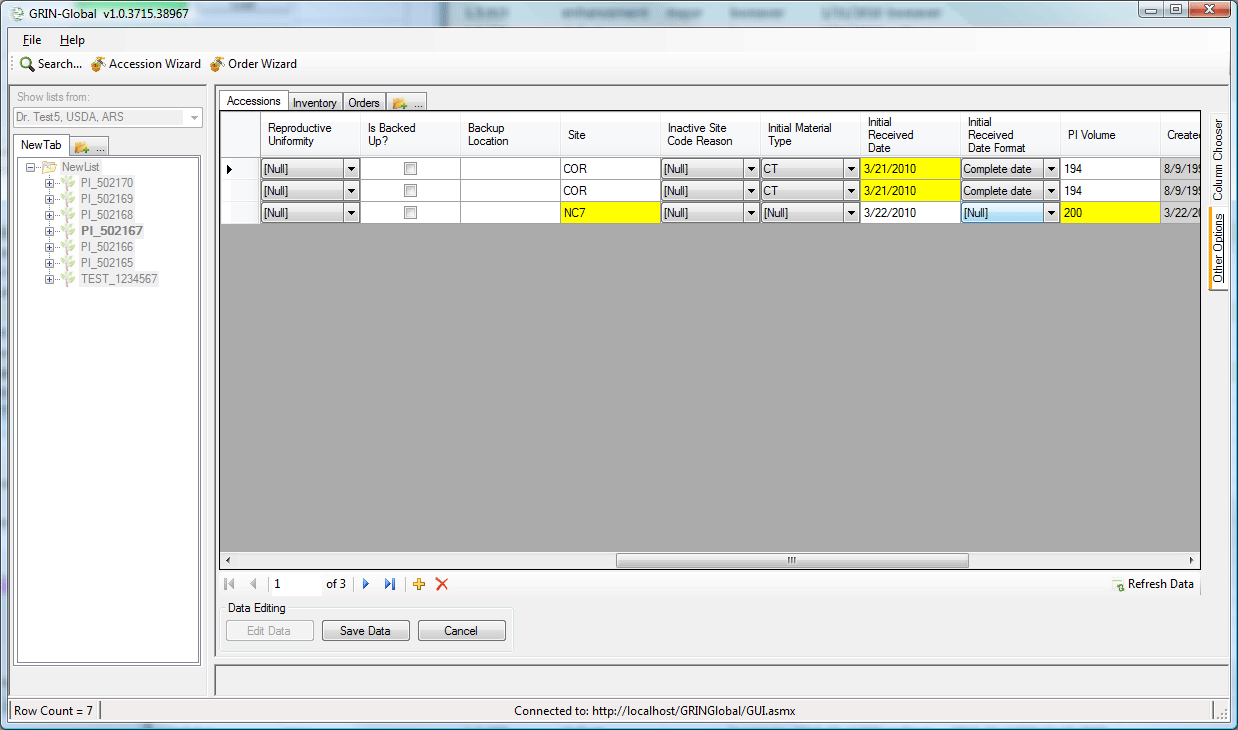
I was unable to recreate this. I had multiple lines with edits, set the hide unchanged rows to HIDE, then moved around within those rows - double clicking in a cell to edit. All rows remained visible. Closing this ticket. If someone else can recreate this issue, please reopen.
(attached screenshot)