
Opened 16 years ago
Closed 16 years ago
#443 closed enhancement (fixed)
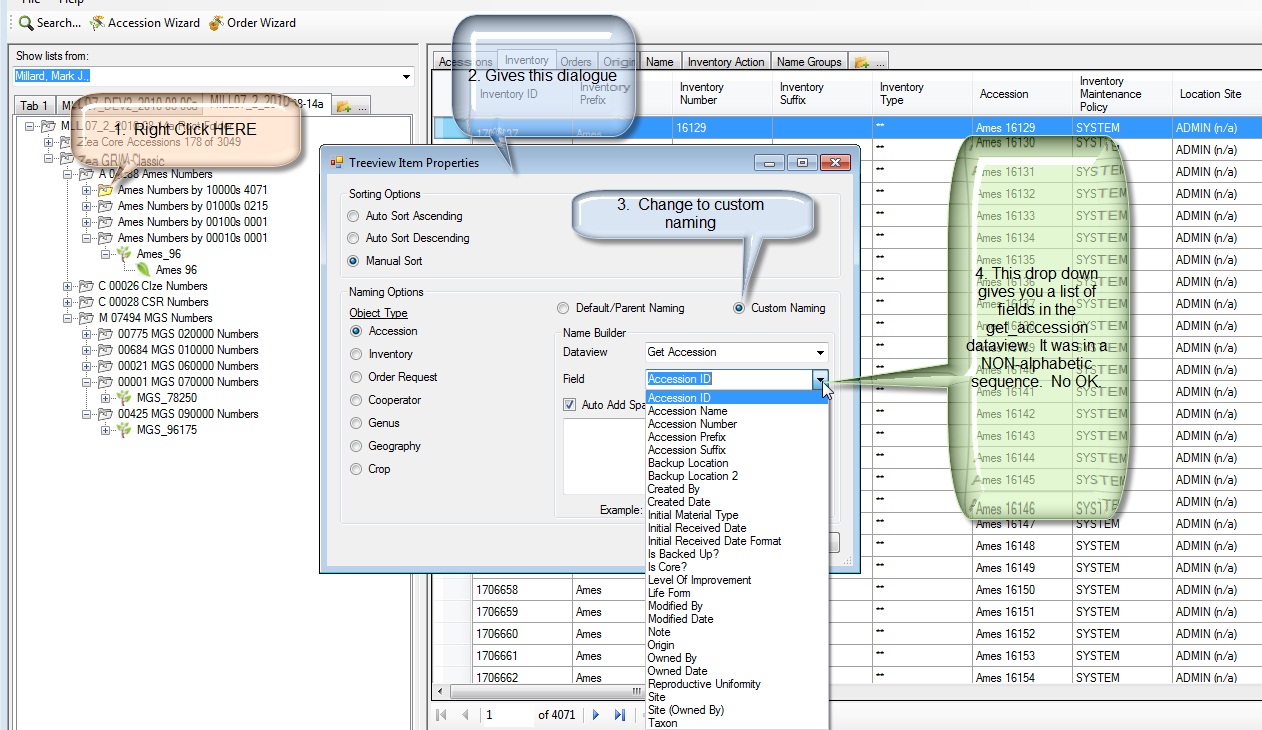
Item names on the dropdown for formatting list objects is not in alphabetic order
| Reported by: | Mark J. Millard | Owned by: | Pete Cyr |
|---|---|---|---|
| Priority: | trivial | Milestone: | Release Candidate 2 |
| Component: | Curator Tool | Version: | 1.0.3873 |
| Severity: | Keywords: | list object format field sort | |
| Cc: | Database Engine: | N/A | |
| Operating System: | N/A |
Description
It appears that the item names in the dropdown for defining the format of a list item is in dataview field sequence not alphabetic. Some may find this would make it difficult for those new to the system to find fields of interest. I am putting this on the list so that all can chime in as to whether this should be alphabetically arranged. Priority can be increased as observations are made by others.
Attachments (1)
Change History (5)
comment:1 by , 16 years ago
| Status: | new → addressed |
|---|---|
| Version: | 1.0.3870 → 1.0.3873 |
comment:2 by , 16 years ago
| Status: | addressed → released |
|---|
comment:3 by , 16 years ago
| Status: | released → verified |
|---|
by , 16 years ago
| Attachment: | CustomNamingObjectSortedCorrectly_2010-08-16.jpg added |
|---|
Demonstration of Correct field sequence in custom naming dialogue. Sorry missed an image on the NON-alphabetic sort
comment:4 by , 16 years ago
| Resolution: | → fixed |
|---|---|
| Status: | verified → closed |
Verified in v1.0.3875.36879
Resolving as fixed.
Note:
See TracTickets
for help on using tickets.


Ok in version v1.0.3875.36879. Items are sorted in dropdown.