
Opened 16 years ago
Last modified 16 years ago
#584 released defect
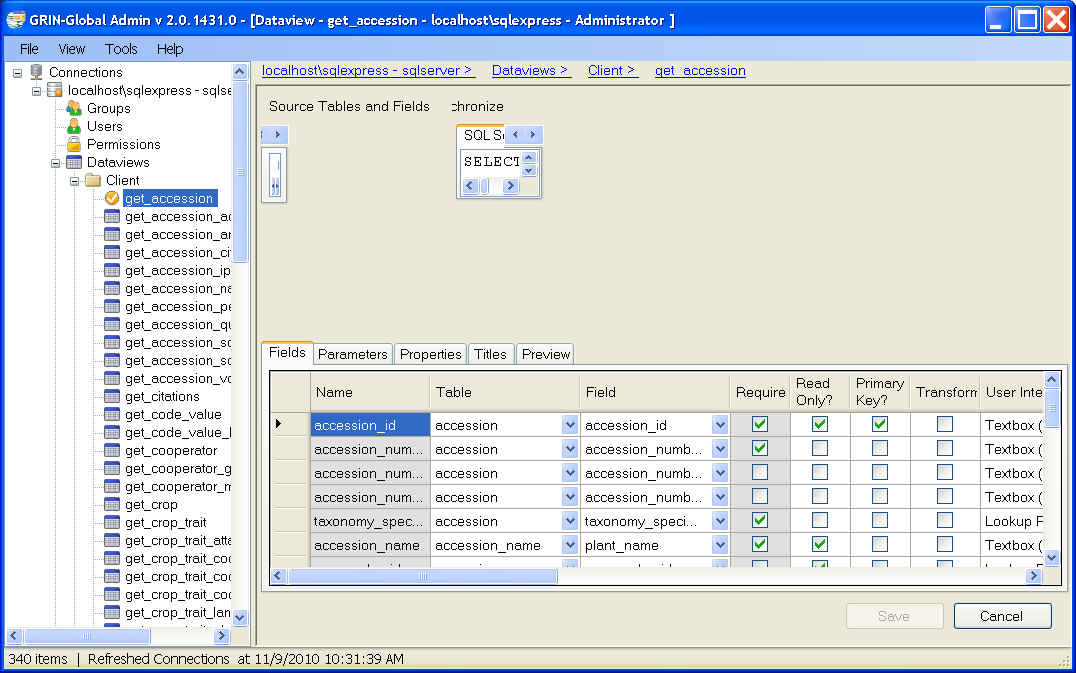
Dataview editor SQL and Tables pane not sized properly
| Reported by: | bweaver | Owned by: | bweaver |
|---|---|---|---|
| Priority: | major | Milestone: | Release Candidate 3 |
| Component: | Admin Tool | Version: | 2.0.1629 |
| Severity: | Keywords: | ||
| Cc: | Database Engine: | N/A | |
| Operating System: | XP Pro 32 bit |
Description
Problem:
The SQL textbox and the tables treeview sometimes is not resizing properly when the Dataview editor is used in the Admin Tool.
To recreate:
Change system DPI from default of 96 to 120. Reboot. Launch Admin Tool. Load any dataview. SQL textbox is tiny and does not fill the available area. Same for tables treeview.
Attachments (1)
Change History (6)
by , 16 years ago
| Attachment: | Admin_dataviews_problem.jpg added |
|---|
comment:1 by , 16 years ago
| Status: | new → accepted |
|---|
comment:2 by , 16 years ago
Temporary workaround: Change system font size back to default of 96 DPI. Right-click desktop, choose properties, Settings tab, Advanced button.
This is not a great solution, but for the time being and with the currently-released code this is the only workaround that exists.
comment:3 by , 16 years ago
I know the root cause for this issue and will be updating the code today.
comment:4 by , 16 years ago
| Status: | accepted → addressed |
|---|
comment:5 by , 16 years ago
| Status: | addressed → released |
|---|
Note:
See TracTickets
for help on using tickets.


Ticket #584, AT not resizing SQL textboxes properly