
Opened 12 years ago
Closed 12 years ago
#942 closed enhancement (fixed)
Change the DATE_FORMAT Titles - Use the Vales for the Titles
| Reported by: | Martin Reisinger | Owned by: | Kurt Endress |
|---|---|---|---|
| Priority: | medium | Milestone: | Post 1.0 |
| Component: | Database, Data Updates | Version: | 1.9.6.33 |
| Severity: | Keywords: | interface date fields | |
| Cc: | Database Engine: | N/A | |
| Operating System: | N/A |
Description
see attached doc
1) Date formats could be made more helpful;
2) we need to move the format fields to the left of the date fields in all dataviews
Attachments (3)
Change History (8)
by , 12 years ago
| Attachment: | Date Formats.docx added |
|---|
by , 12 years ago
| Attachment: | 2DigitYearFormat.jpg added |
|---|
comment:1 by , 12 years ago
comment:2 by , 12 years ago
| Component: | Curator Tool → Database |
|---|
comment:3 by , 12 years ago
| Type: | defect → enhancement |
|---|
My initial trac request here was misinterpreted. I am not asking for a two digit year. I understand the reasons why using 4-digit year is better than a 2-digit year.
I used the 2-digit year only as an example of what happens in general when the user doesn’t understand what to input - s/he gets literally stuck. In the last two workshops, this happened multiple times -- users inputted a two digit year, after selecting the "Year" format. 4 digits for the year is somewhat universally known, but proof that it isn't, was the number of times people did this until they were assisted.
The reason for this trac ticket is to make the "prompts" more user friendly for the date formats. How? Include the format as part of the title, as per my suggestion in the original trac ticket attachment: "Suggestion: Use the Value in the Title (Ideally this info would be in the Description, but Descriptions don't necessarily display.)
As an analogy, good website forms that are intuitive include the required format of a telephone number. A user seeing (nnn) nnn-nnnn understands what is expected. The user is shown upfront what to input.
Attached is another image - where I am illustrating this idea. I only changed one format in the example – Year [yyyy] – But they all should be formatted to include the required format in a consistent way.
I had designated Quinn as the owner so that he would make changes in the AT so that they would be in the next build. Unfortunately, we can have only one owner, or I would have assigned the second part of the request to Kurt. We need all of the dataviews that use the Date Format field to have the field repositioned to the left of the date field.
by , 12 years ago
| Attachment: | values in date format titles.jpg added |
|---|
comment:4 by , 12 years ago
| Owner: | changed from to |
|---|---|
| Status: | new → assigned |
Code titles were changed in npgsdev and db, csv created for build
comment:5 by , 12 years ago
| Resolution: | → fixed |
|---|---|
| Status: | assigned → closed |
I added a new trac ticket 949 to handle the 2nd part of my initial request since these were two distinct tasks
This ticket is complete


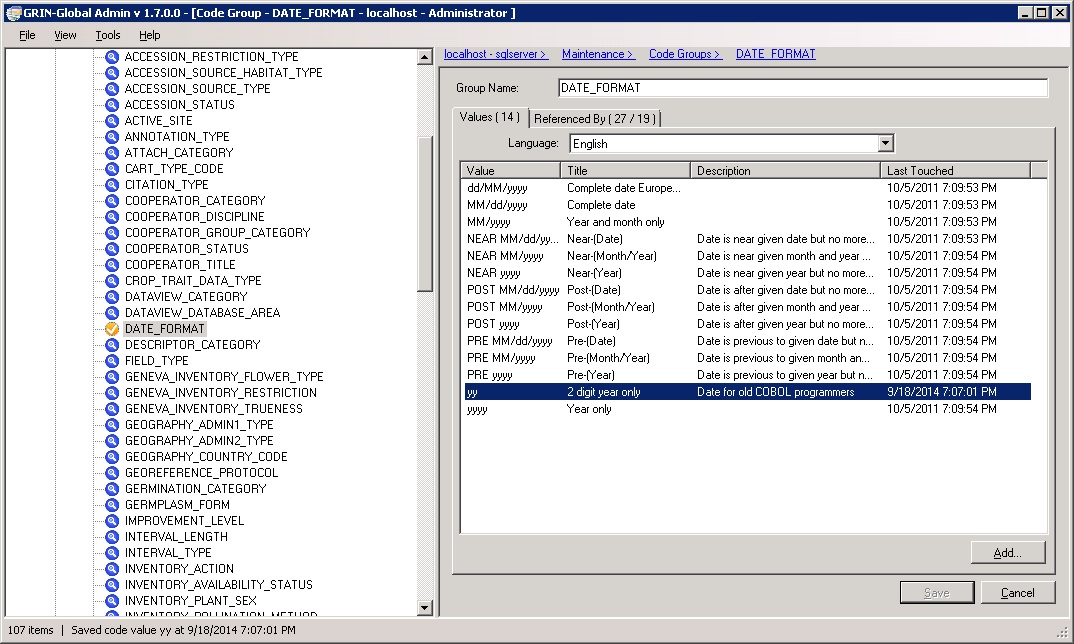


Marty... You can add a 2 digit year format (see new attachment) and it will allow you to enter only two digits - however which century is chosen is not defined (in my testing it defaulted to this century but you are relying on the OS to make the decision - and in my opinion this is a very bad idea) We should no longer allow 2 digit year entries for NPGS data. We must ask ourselves why is 2 digits acceptable but 4 digits too onerous for data entry? It is only two extra key presses to enter a complete year but the upside is that all doubt about which century is intended is avoided.