
Opened 12 years ago
Last modified 9 months ago
#945 addressed enhancement
Order Wizard Error Count Mentions an Error Count not Verifiable
| Reported by: | Martin Reisinger | Owned by: | Pete Cyr |
|---|---|---|---|
| Priority: | medium | Milestone: | CT 1.9.9.4 |
| Component: | CT Order Wizard | Version: | 1.9.6.41 CT |
| Severity: | 1 -- Low Effort | Keywords: | error messages, interface |
| Cc: | Database Engine: | N/A | |
| Operating System: | N/A |
Description
When using the Order Wizard, when saving I get an error count In the attached file, 3 errors were mentioned. The Order tab screen doesn't update immediately, but will when you click off to another tab and then return. When you redisplay the Order tab, the red i displays. There is also a red i on the action tab window. However, these are the two as a user that I can see - but the error mentions 3 errors.
Attachments (11)
Change History (23)
by , 12 years ago
| Attachment: | Error Count.docx added |
|---|
comment:1 by , 12 years ago
comment:2 by , 12 years ago
Marty... I'm not able to replicate this problem - should I mark it as 'works for me'? btw... If we do mark it as 'works for me' and later it happens to you again we can re-open the ticket.
comment:3 by , 12 years ago
In 1.9.6.41, I am still getting the same error count. There are actually two behaviors that throw the user off. Once is the rror count; the other is that one of the errors doesn't display until you click off the current tab.
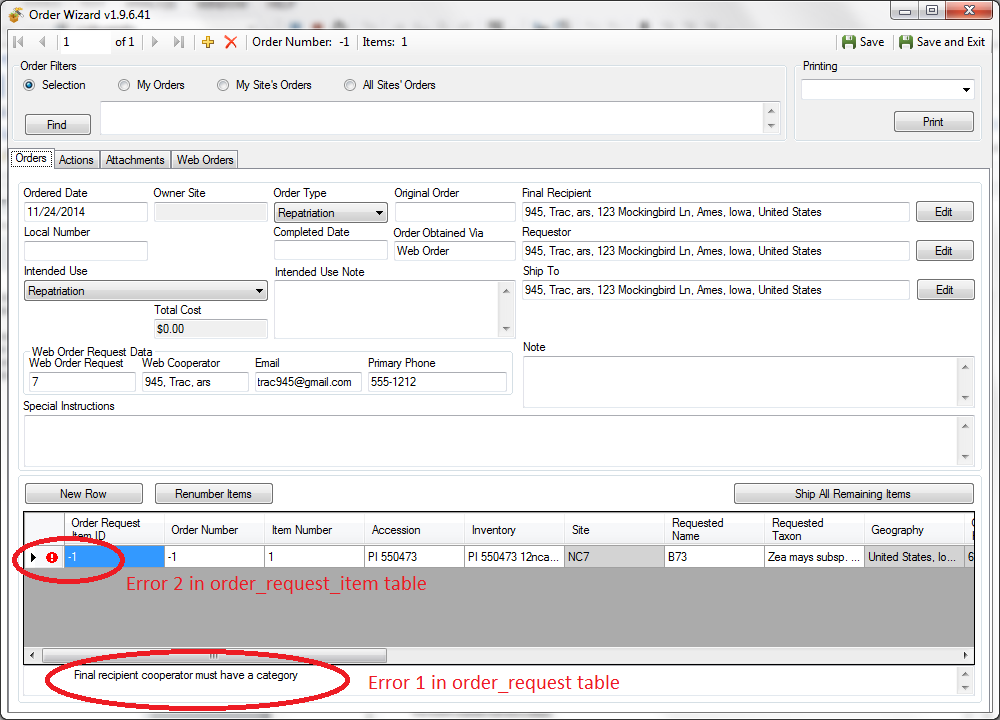
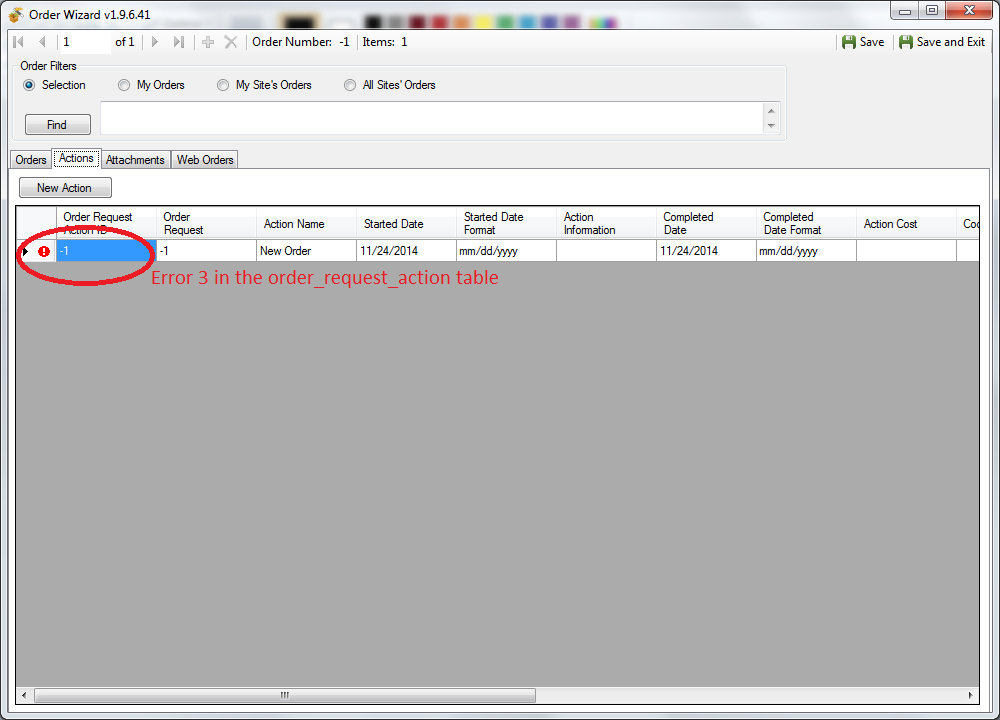
When you get the original error count, the number indicates "n" number of errors. So then the user will look for that number. In this example, I received 3. On the current tab there aren't any, so I click on the next tab - Actions - and see one error. I don't see any on the other two tabs - Attachments and Web Orders. However, if I return to the first tab - a new Red Dot indicator displays and indicates a second error. I still can't locate a third error.
To make this specific error, I created a new PW user account and made an order. When processing the Web Order with the CT, I used the Create New Cooperator feature. I knew that the order would fail if I tried to save the Order - why? Because the New Order feature does not create a "Category" for the Cooperator when it creates the new Cooperator record, and our GG implementation has a trigger looking for a Category for the Cooperator.
I attached four images that I made in sequential order.
To summarize, so that the developer can duplicate this:
- create a new PW order from a new requester account
- in the CT, with the Order Wizard (OW), locate the web order
- using the OW, convert the Web Order to a standard order
- save the order
by , 12 years ago
| Attachment: | errors 3 1 2014-11-24_17-47-05.gif added |
|---|
by , 12 years ago
| Attachment: | errors 3 2 2014-11-24_17-47-32.gif added |
|---|
by , 12 years ago
| Attachment: | errors 3 3 2014-11-24_17-48-26.gif added |
|---|
by , 12 years ago
| Attachment: | errors 3 4 2014-11-24_17-49-26.gif added |
|---|
comment:4 by , 12 years ago
The Accession Wizard also exhibits a similar behavior - the number of error messages does not initially match the number cited by the warning. Attached are three images showing the sequence. The user does not see a second error display unless the user leaves the current tab and then returns back to it later. In this scenario, I attempted to add a Source Observation record without adding the Source record first. (When I train users, I stress starting from the top left and competing the three panels in that order to avoid this error.)
by , 12 years ago
| Attachment: | errors acc wiz 2 1 2014-11-24_18-40-50.gif added |
|---|
by , 12 years ago
| Attachment: | errors acc wiz 2 2 2014-11-24_18-40-50.gif added |
|---|
by , 12 years ago
| Attachment: | errors acc wiz 2 3 2014-11-24_18-40-50.gif added |
|---|
comment:5 by , 12 years ago
Marty... I just added two images to this ticket to help explain why this is working as designed. There are 3 errors reported and there are indeed three errors in the collection of tables for this order. The first error is in the order_request (parent) table itself and this is because of the missing category in the cooperator record. The second error is in the order_request_item table because it cannot be saved until the order_request record is saved (can't save a child until the parent is saved). The third error is in the order_request_attach table for the same reason as the second error.
comment:6 by , 12 years ago
Unfortunately I think that improvements are still needed if the error messages are to be truly helpful to the typical user. Currently the user is expected to click on another tab and then click back to the first tab before any errors display on the first tab. The error at the bottom is not consistent with the others -- they had red dots, it does not. (suggestion - if it is not possible to include the red i with the bottom message, then make the text red so that the text is prominent, otherwise. it is not noticeable. Third, the red i error messages should be more meaningful - only the text at the bottom was meaningful and provided any clue to the problem.
by , 12 years ago
| Attachment: | ow errors 2014-11-26_10-42-28.gif added |
|---|
comment:7 by , 12 years ago
Yesterday (after the most recently submitted comment), I received the following email from a user: "Can you please look at web order 2192? I just made it and every time i try to process it I get 8 save errors (6 are for the items), including that phrase that appears at the bottom in the red circle. All I did was hit the Create new order request button. It swapped tabs to the order tab and then I try to save it and it freaks out:" The image is attached to this trac ticket.
The gist of this ticket is that the typical user is confused by what is happening. Something needs to be changed. One suggestion would be to change either the logic of the trigger or the OW to prompt the user in a more visible way -- so that the user realizes what is wrong in layperson's terms. The error messages produced by the red i's are not helpful to the typical, non-IT user. The message at the bottom is the most helpful, but it is not obvious - first it does not initially display, and then if the user returns to that Orders tab, it just doesn't stand out. At a minimum, change the color of the text to "red."
comment:8 by , 12 years ago
| Component: | Curator Tool → CT Order Wizard |
|---|
comment:9 by , 12 years ago
| Priority: | minor → medium |
|---|---|
| Type: | defect → enhancement |
| Version: | 1.9.6.33 → 1.9.6.41 CT |
comment:11 by , 6 years ago
| Milestone: | Post 1.0 → CT 1.9.9.4 |
|---|
comment:12 by , 9 months ago
| Severity: | → 1 -- Low Effort |
|---|
Even though this was addressed in the CT v1.9.9.4 build (3/16/2020), I have augmented the visual display in the CT v1.26.2.23 build to use a red background in the textbox at the bottom used to display errors in the order_request table. This is being done in hopes fo drawing attention to the error at the bottom of the Order Wizard window. If there are no objections I plan to close this Trac ticket in the next release build.





Marty I will need the scenario you used to make this happen. Without it I cannot duplicate your error to see if the Curator Tool code needs modifications. Can you document the steps you took to make this happen? Including how many orders you were processing, was the order with errors coming from a web_order_request, and what server you did this testing on.